One Shared Screen or Several Small Groups?
One shared screen or several small groups? Choose a communal viewing layout that makes discussion audible, arrivals easy and different voices welcome.
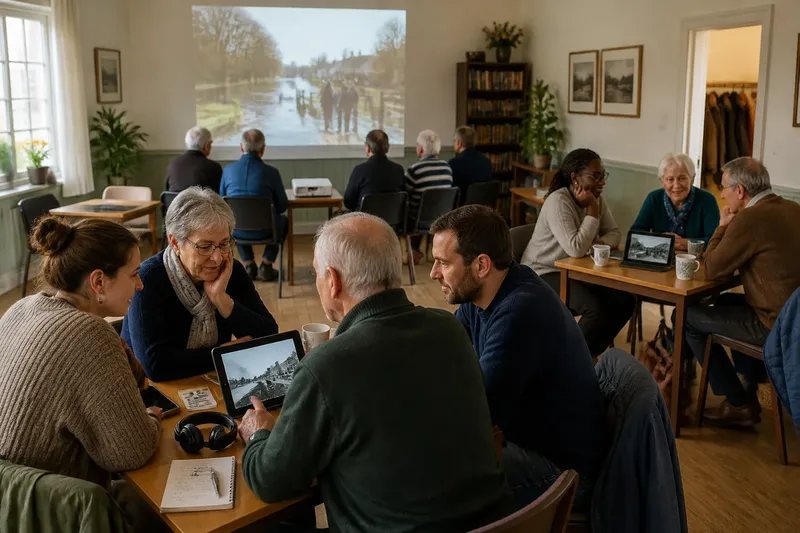
One shared screen or several small groups? The choice affects whether people can hear one another, follow a story and join after it has started. For a village hall, library room or community café, begin with the kind of gathering you want: a common experience, or several conversations around related content.
Start with the purpose
A single screen gives everyone the same image and sound at the same moment. It suits a film night, a local-history presentation or a live event where shared reactions matter. One pause, laugh or question can travel through the room.
Several small groups suit a session where people want to talk, compare clips or choose what to watch. A set of tablets or laptops can let each table move at its own pace, but the room no longer has one shared rhythm. Decide which quality matters more before arranging chairs or borrowing equipment.
One screen, one audience
With one display, arrange seats so people can see without twisting round, and leave a clear route from the entrance. In a village hall, a projector and plain wall may work for a larger gathering; in a smaller room, a television can be easier to see without darkening the space.
Keep discussion audible without asking everyone to compete with the soundtrack. If conversation is part of the event, pause between sections or leave a planned moment for questions. For a story with unfamiliar names or local details, a short spoken introduction can help late arrivals catch the thread without interrupting the viewing.
The main trade-off is control. The organiser chooses the content, pace and volume, so people who arrive late or need a break may feel they have to wait for the group. Offer a seat near an aisle and make it clear that stepping out and returning is welcome.
Several small circles
Small groups make it easier to hear a neighbour and to stop a clip for discussion. A library might put a tablet on each table for a set of short oral-history recordings, with headphones available for anyone who prefers to listen privately. Keep the screens angled so nearby groups do not distract one another.
This arrangement asks more of the host. People may need help finding the right clip, adjusting sound or sharing a device. Give each group a simple prompt card, such as “Which place in this story do you recognise?” and name one person who can help with basic playback.
Several screens can also split attention. If each group watches unrelated material, there may be little to connect people when they come together again. Choose a common theme, then let groups discuss different pieces within it; a brief closing conversation can bring their observations back into the room.
Make joining easy
Joining in is not only a question of where someone sits. A person may arrive late from work, be unsure whether they are expected to speak, or find the sound difficult to follow. Make the format visible: tell people whether they can come and go, ask questions, or simply watch.
For either arrangement, check that captions are available where possible, keep spoken instructions brief and avoid relying on tiny text on screen. In a multi-group session, offer a printed title or short description so nobody has to peer over another person’s shoulder to work out what is playing.
Say a community group is deciding how to share a collection of local flood memories. If the aim is to hear the recordings together and notice how one account changes the next, choose one screen and pause between clips. If the aim is to compare which landmarks each table recognises, use several small groups, give them the same selection and bring everyone back for a short exchange.
Which layout fits?
When is one shared screen better?
Choose one screen when timing, shared emotion or a single narrative matters most. It also makes it easier for a host to introduce content once and guide a discussion as a whole group.
When do small groups work better?
Use small groups when conversation and choice are central, or when people need to watch at different speeds. Keep a shared theme or prompt so the session still feels connected.
Can the two formats be combined?
Yes: begin together with a short clip, then let tables discuss or explore related material on separate devices. Bring the room back together with one clear question rather than a long round of reports.
What should I decide before booking equipment?
Decide whether people need to hear one another, how many may arrive or leave during the session, and who will help with playback. Then check what screens, speakers and connection options the venue already has.
Choose for conversation
One shared screen or several small groups is ultimately a choice about the conversation you want to make possible. A single display gathers attention; separate circles give people more room to steer their own discussion. If the purpose is mixed, combine the formats rather than expecting one layout to serve every moment.
Before the gathering, walk through the room as if you were arriving for the first time. Notice whether the screen is visible from the doorway, whether a quiet seat is available and where someone can ask for help without stopping everyone else. Those small decisions often determine whether a neighbour feels able to join, stay and take part.